
Dictionary 可以不經過大小寫轉換就可以查詢摟!
只需要加上StringComparer.OrdinalIgnoreCase
using System;
using System.Collections.Generic;

namespace Test
{
    class Program
    {
        static void Main(string[] args)
        {
            Dictionary<string, string> d = new Dictionary<string, string>(StringComparer.OrdinalIgnoreCase)
            {
                { "AbCdEfG" , "123456" }
            };
            Console.WriteLine(d["abcdefg"]);
        }
    }
}SevenZipSharp 下載:http://sevenzipsharp.codeplex.com/ 或 SevenZipSharp
using System;
using System.IO;
using System.Threading;
using SevenZip;

namespace Test
{
    class Program
    {
        static void Main(string[] args)
        {
            string ApplicationBase = System.AppDomain.CurrentDomain.SetupInformation.ApplicationBase;

            //壓縮檔案
            {
                string zip_name = Path.Combine(ApplicationBase, "test.7z");
                string dir_route = Path.Combine(ApplicationBase, "test");
                SevenZipCompressor sz = new SevenZipCompressor();
                sz.ArchiveFormat = OutArchiveFormat.SevenZip;
                sz.CompressionLevel = CompressionLevel.Ultra;
                sz.CompressDirectory(dir_route, zip_name);
            }

            //壓縮檔案並顯示進度
            {
                string zip_name = Path.Combine(ApplicationBase, "test1.7z");
                string dir_route = Path.Combine(ApplicationBase, "test");
                Thread t = new Thread(() =>
                {
                    SevenZipCompressor tmp = new SevenZipCompressor();
                    tmp.FileCompressionStarted += new EventHandler<FileNameEventArgs>((s, e) =>
                    {
                        Console.WriteLine(String.Format("[{0}%] {1}", e.PercentDone, e.FileName));
                    });
                    tmp.CompressionFinished += new EventHandler<EventArgs>((s, e) =>
                    {
                        Console.WriteLine("壓縮完成");
                    });
                    tmp.CompressDirectory(dir_route, zip_name);
                });
                t.Start();
                t.Join();
            }

            //解壓縮檔案(全部)
            {
                string zip_name = Path.Combine(ApplicationBase, "test.7z");
                string dir_route = Path.Combine(ApplicationBase, "test1");
                using (SevenZipExtractor tmp = new SevenZipExtractor(zip_name))
                {
                    tmp.ExtractArchive(dir_route);
                }
            }

            //解壓縮檔案並顯示進度
            {
                string zip_name = Path.Combine(ApplicationBase, "test.7z");
                string dir_route = Path.Combine(ApplicationBase, "test2");
                Thread t = new Thread(() => {
                    using (SevenZipExtractor tmp = new SevenZipExtractor(zip_name))
                    {
                        tmp.FileExtractionStarted += new EventHandler<FileInfoEventArgs>((s, e) =>
                        {
                            Console.WriteLine(String.Format("[{0}%] {1}", e.PercentDone, e.FileInfo.FileName));
                        });
                        tmp.ExtractionFinished += new EventHandler<EventArgs>((s, e) =>
                        {
                            Console.WriteLine("完成解壓縮");
                        });
                        tmp.ExtractArchive(dir_route);
                    }
                });
                t.Start();
                t.Join();
            }

            //列出壓縮檔內容
            {
                string zip_name = Path.Combine(ApplicationBase, "test.7z");
                using (SevenZipExtractor tmp = new SevenZipExtractor(zip_name))
                {
                    for (int i = 0; i < tmp.ArchiveFileData.Count; i++)
                    {
                        Console.WriteLine(tmp.ArchiveFileData[i].FileName.ToString());
                    }
                }
            }
            Console.ReadLine();
        }
    }
}
不須透過迴圈,直接將Array專為List
using System;
using System.Collections.Generic;

namespace Test
{
    class Program
    {
        static void Main(string[] args)
        {
            string[] s = { "a", "b", "c", "d", "e" };
            List<string> l = new List<string>(s);
            Console.WriteLine(String.Join(",", l.ToArray()));
        }
    }
}不須透過迴圈,直接將ArrayList專為Array
using System;
using System.Collections;

namespace Test
{
    class Program
    {
        static void Main(string[] args)
        {
            ArrayList ALs = new ArrayList() { "a", "b", "c", "d", "e" };
            ArrayList ALi = new ArrayList() { 1, 2, 3, 4, 5 };

            string[] s = (string[])ALs.ToArray(typeof(string)); //字串轉換
            int[] i = (int[])ALi.ToArray(Type.GetType("System.Int32")); //數值轉換

            Console.WriteLine(String.Join(",", s));
            Console.WriteLine(String.Join(",", i));
        }
    }
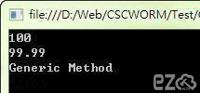
}以往使用的都稱為"泛型",int,double,string......
using System;

namespace Test
{
    class Program
    {
        static void Main(string[] args)
        {
            int number1 = 100;
            double number2 = 99.99;
            string str = "Generic Method";

            Console.WriteLine(GenericMethod<int>(number1));
            Console.WriteLine(GenericMethod<double>(number2));
            Console.WriteLine(GenericMethod<string>(str));
        }
        static GM GenericMethod<GM>(GM v)
        {
            GM r = v;
            return r;
        }
    }
}
Action<T> 沒有回傳值的委派: 兩總寫法:
using System;

namespace Test
{
    class Program
    {
        static void Main(string[] args)
        {
            Action A1 = new Action(() =>
            {
                Console.WriteLine("Action1");
            });

            //or

            Action A2 = () =>
            {
                Console.WriteLine("Action2");
            };

            A1();
            A2();
        }
    }
}當多個執行緒共用變數使用Lock及Monitor,可以達到鎖定的效果!
但如果此時有執行緒需要讀取變數,就需要等待Lock結束後才能進行讀取,造成單一時間只能有一個執行緒動作,系統自然會降低效能,此時就能採用ReaderWriterLock ,即可解決問題。
ReaderWriterLock 允許同時間讓執行緒進行鎖定及讀取動作,如果執行緒不常寫入,大部份的時間都在讀取,那效能會優於Lock及Monitor!
using System;
using System.Collections.Generic;
using System.Threading;

namespace Test
{
    class Program
    {
        static void Main(string[] args)
        {
            ReaderWriterLock rwLock = new ReaderWriterLock();
            int count = 0;
            List<Thread> List_Thread = new List<Thread>();
            for (int i = 0; i < 10; i++)
            {
                //建立執行緒
                List_Thread.Add(new Thread(() =>
                {
                    int temp = 10000;
                    while (temp-- > 0)
                    {
                        rwLock.AcquireWriterLock(Timeout.Infinite); //開始鎖定
                        count++;
                        rwLock.ReleaseWriterLock(); //結束鎖定
                    }
                }));
                List_Thread[i].Start();
            }

            //等待所有執行緒完成
            foreach (Thread t in List_Thread) t.Join();
            Console.WriteLine(count.ToString());
            Console.ReadLine();
        }
    }
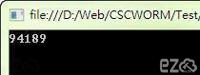
}當使用多個Thread,共用一個變數進行加總,為什麼總合會不同? 範例程式碼:
using System;
using System.Collections.Generic;
using System.Threading;

namespace Test
{
    class Program
    {
        static void Main(string[] args)
        {
            int count = 0;
            List<Thread> List_Thread = new List<Thread>();
            for (int i = 0; i < 10; i++)
            {
                //建立執行緒
                List_Thread.Add(new Thread(() =>
                {
                    int temp = 10000;
                    while (temp-- > 0) count++;
                }));
                List_Thread[i].Start();
            }
            //等待所有執行緒完成
            foreach (Thread t in List_Thread) t.Join();
            Console.WriteLine(count.ToString());
            Console.ReadLine();
        }
    }
}
結果畫面:
使用C#進行n進為轉換
using System;

namespace Test
{
    class Program
    {
        static void Main(string[] args)
        {
           Console.WriteLine(System.Convert.ToString(10, 2)); //十進位轉換二進位
            Console.WriteLine(System.Convert.ToString(10, 8)); //十進位轉換八進位
            Console.WriteLine(System.Convert.ToString(10, 16)); //十進位轉換十六進位
        }
    }
}當在寫迴圈時,更改Form上的object,但無法即時更新嗎? 只要在更改object後加入 this.Refresh(); 即可。
using System;
using System.Windows.Forms;

namespace Test
{
    public partial class Form1 : Form
    {
        public Form1()
        {
            InitializeComponent();
        }

        private int x = 0;
        private void Form1_Load(object sender, EventArgs e)
        {

        }

        private void button1_Click(object sender, EventArgs e)
        {
            for (int i = 0; i < 100; i++)
            {
                ShowText(i + 1);
                this.Refresh(); //加入這行
                System.Threading.Thread.Sleep(100);
            }
        }

        //顯示文字到label
        private void ShowText(int i)
        {
            label1.Text = i.ToString();
        }
    }
}